








Simption Tech Pvt Ltd SIMPTION

College Android App Plans

Simption Campus — one app for students, staff, admins and parents.

Simption Campus is the college edition of our Android app, built for the way a college actually runs: semesters and sections instead of classes, lecture-wise attendance, internal and university exams, a library, hostels and a placement cell. Students, staff, admins and parents each sign in to their own home screen, on one install, connected live to the Simption College Software.

App Demo

See the College App in Action

Live screens from Simption Campus — tap any card to install the demo and walk through the same screens yourself.

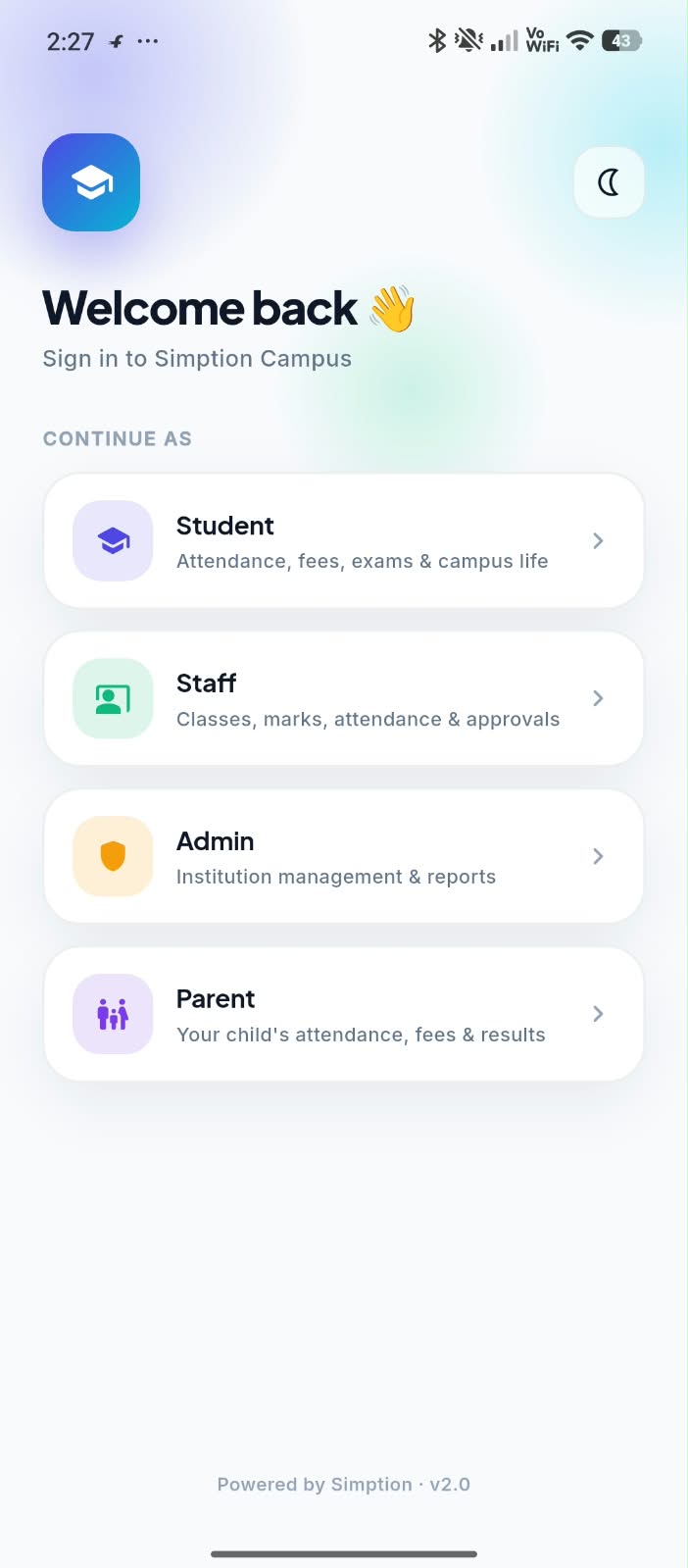
Simption Campus App — Sign In as Student, Staff, Admin or Parent screen
Install Demo App

01 · One App, Four Roles

Sign In as Student, Staff, Admin or Parent

Simption Campus opens on a clean sign-in that asks one thing: who are you? Student, Staff, Admin or Parent — each role gets its own home screen after login, so a parent never sees staff tools and a student never sees admin panels. Dark mode is one tap away.

  • Student, Staff, Admin and Parent in one install
  • Role-based home screens after login
  • Light and dark mode
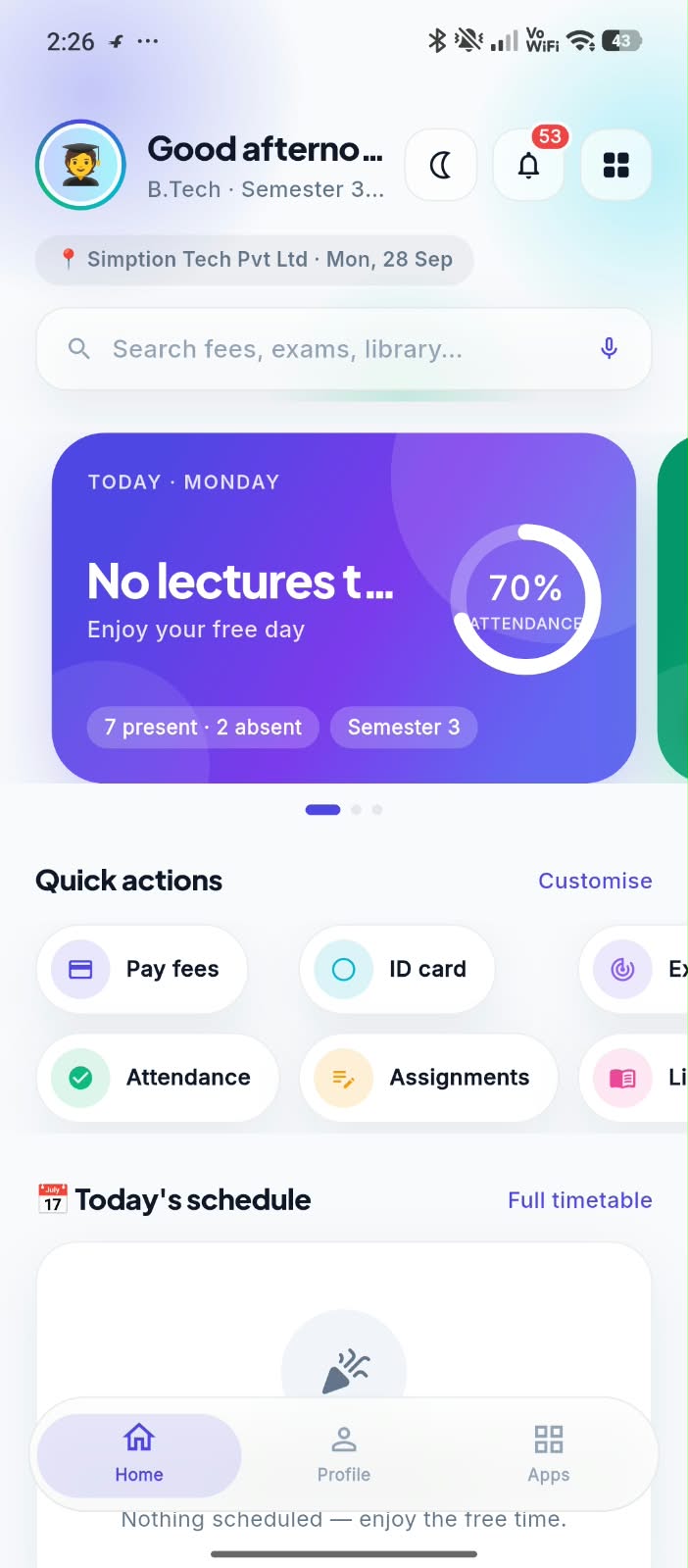
Simption Campus App — Student Home screen
Install Demo App

02 · Student

Student Home

The student is greeted by name with their course and semester, today's attendance ring (present vs absent), and the day's lecture schedule. Quick actions put Pay Fees, ID Card, Attendance, Assignments, Exams and Library one tap away, and a search box finds any fee, exam or book instantly.

  • Live attendance percentage on the home card
  • Today's schedule with full timetable link
  • Quick actions you can customise
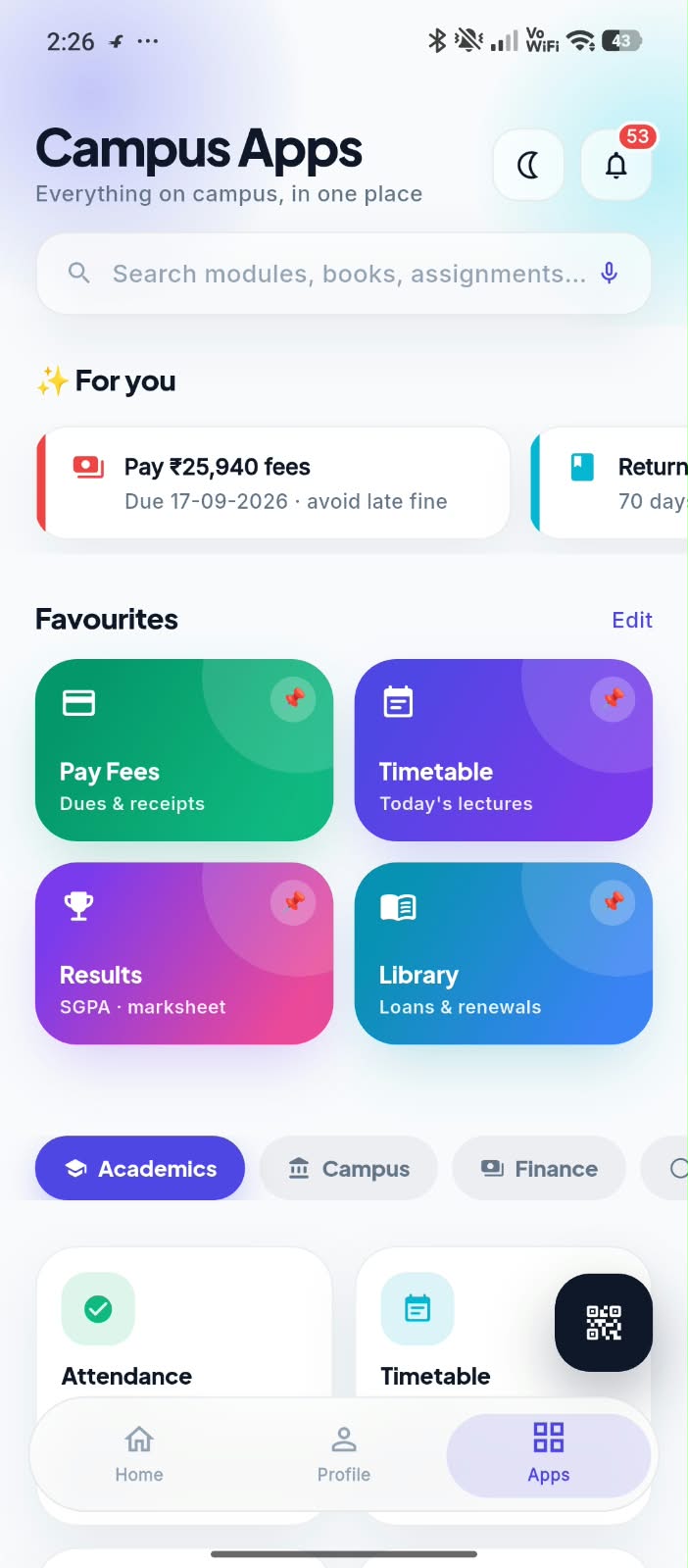
Simption Campus App — Campus Apps screen
Install Demo App

03 · Student

Campus Apps

Every campus service in one place. "For you" surfaces what needs action now — a fee due date, a library book to return — while Favourites pin Pay Fees, Timetable, Results and Library. Modules are grouped into Academics, Campus and Finance tabs, with a QR scanner for attendance and gate entry.

  • "For you" reminders: fees due, books to return
  • Pinned favourites for daily use
  • Academics, Campus and Finance tabs
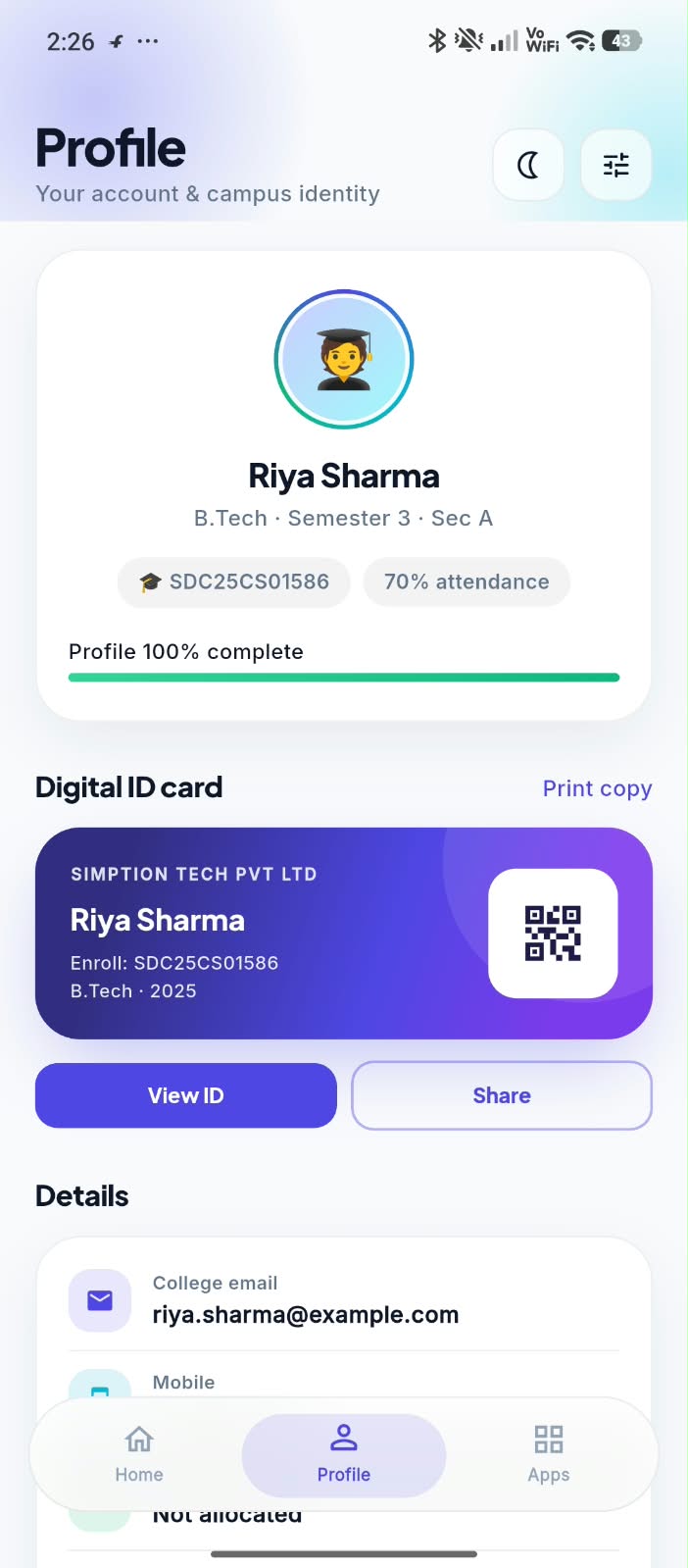
Simption Campus App — Profile & Digital ID Card screen
Install Demo App

04 · Student

Profile & Digital ID Card

The profile shows the student's course, semester, section, enrolment number and attendance percentage with a profile-completeness bar. Below it sits a Digital ID Card with QR code — view it, share it or print a copy — plus college email, mobile and hostel details.

  • Digital ID card with QR code
  • View, share or print the ID
  • Enrolment, attendance and contact details
Simption Campus App — Admin Home screen
Install Demo App

05 · Admin

Admin Home

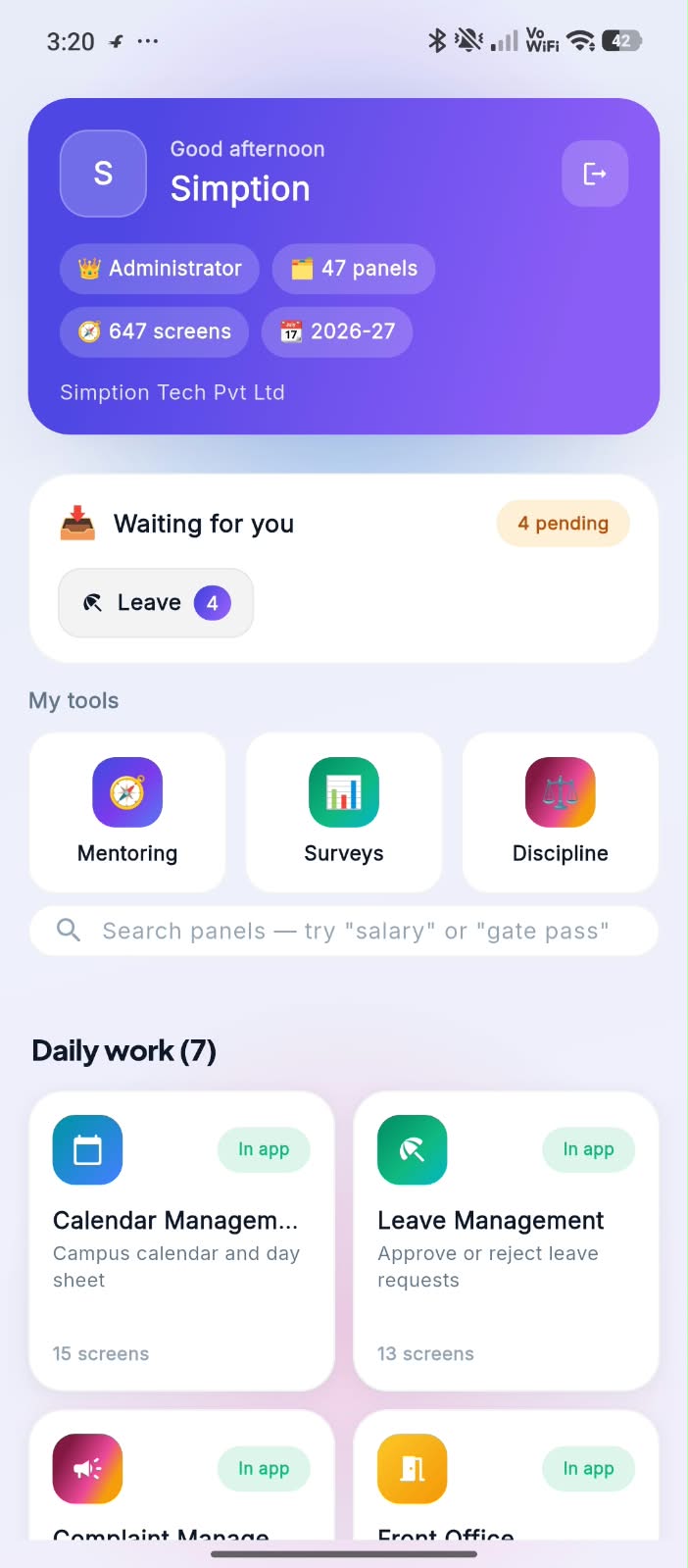
The administrator lands on a dashboard that says how big the system is — 47 panels, 647 screens, the current session — and what's waiting: pending leave approvals right on top. My Tools keeps Mentoring, Surveys and Discipline close, and a search box jumps to any panel, from salary to gate pass.

  • Pending approvals on the home screen
  • Mentoring, Surveys and Discipline tools
  • Search any panel by name
Simption Campus App — Daily Work Panels screen
Install Demo App

06 · Admin

Daily Work Panels

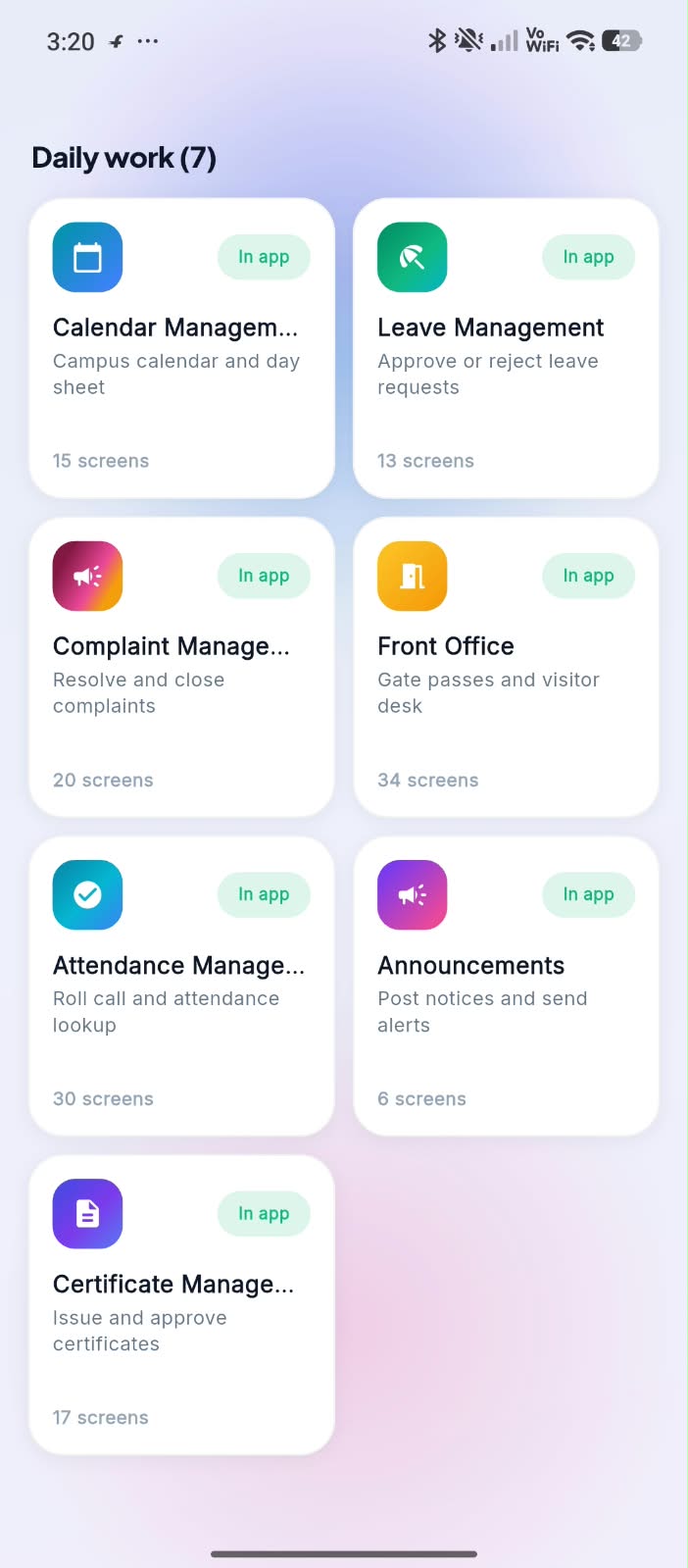
The admin's daily work is grouped into cards: Calendar, Leave, Complaints, Front Office (gate passes and visitors), Attendance, Announcements and Certificates — each showing how many screens it holds and that it runs fully in the app, so approvals and notices don't wait for a desktop.

  • Approve leave and resolve complaints from the phone
  • Gate passes and visitor desk in Front Office
  • Post announcements and issue certificates

Built for Every Role

What Each Role Gets in the App

One install, four logins. Each role sees only its own tools — nothing more, nothing missing.

Students

Everything for the semester in their pocket.

  • Attendance percentage and daily schedule
  • Pay fees and download receipts
  • Assignments, exams, results and marksheet
  • Library loans and renewals
  • Digital ID card with QR code
  • Notifications and campus announcements

Staff

Classes, marks and approvals without a desktop.

  • Mark lecture attendance
  • Enter internal and exam marks
  • Post assignments and study material
  • Apply for and approve leave
  • Own attendance and payslips
  • Mentoring and counselling records

Admin

The whole institution, 47 panels deep.

  • Pending approvals on the home screen
  • Leave, complaints and discipline
  • Front Office: gate passes and visitors
  • Announcements and certificates
  • Surveys and feedback
  • Search any panel: salary, gate pass, hostel

Parents

Their ward's college life, without calling the office.

  • Ward's attendance and results
  • Fee dues and online payment
  • Exam schedule and notices
  • Hostel and transport details
  • Complaint and feedback channel
  • Same app, separate parent login

Compare Plans

Our Android App Plans for College

Panels Silver Plan Gold Plan Diamond Plan Platinum Plan
My Profile ✓ ✓ ✓ ✓
Notification ✓ ✓ ✓ ✓
E-Books & Notes ✓ ✓ ✓ ✓
Faculty Info ✓ ✓ ✓ ✓
Birthday ✓ ✓ ✓ ✓
Fees ✓ ✓ ✓ ✓
Attendance (Lecture-wise) ✓ ✓ ✓ ✓
Academic Calendar ✓ ✓ ✓ ✓
Time Table ✓ ✓ ✓ ✓
Message ✓ ✓ ✓ ✓
Lecture Notes ✕ ✓ ✓ ✓
Video Lecture ✕ ✓ ✓ ✓
Live Class ✕ ✓ ✓ ✓
Assignments ✕ ✓ ✓ ✓
Study Material ✕ ✓ ✓ ✓
Important Video ✕ ✓ ✓ ✓
Student Activity ✕ ✕ ✓ ✓
Leave ✕ ✕ ✓ ✓
Examination & Results ✕ ✕ ✓ ✓
Online Exam ✕ ✕ ✓ ✓
Gallery ✕ ✕ ✓ ✓
Complaint ✕ ✕ ✓ ✓
Library ✕ ✕ ✓ ✓
Digital ID Card ✕ ✕ ✓ ✓
Hostel ✕ ✕ ✕ ✓
Placement & Alumni ✕ ✕ ✕ ✓
Bus Tracking ✕ ✕ ✕ ✓
Faculty App ✕ ✕ ✕ ✓
Driver App ✕ ✕ ✕ ✓
Admin App ✕ ✕ ✕ ✓

Free Brochure

Get the Full Simption Brochure

See every module, plan and pricing in one PDF, sent straight to you.

Call WhatsApp

Book a Free Demo

We'll get in touch within 24 hours.