Everything Telecaller24 does — the whole list.
Most feature pages show you six things and hope you don't ask about the seventh. This is the full inventory: every module in the admin panel, every screen in the rep's own browser portal, and everything the Android app does on the phone. If something here matters to you, ask for it by name on the demo and we'll open it.
Free for 5 numbers for 15 days. No credit card. Android.
Seven ways to cut the same day.
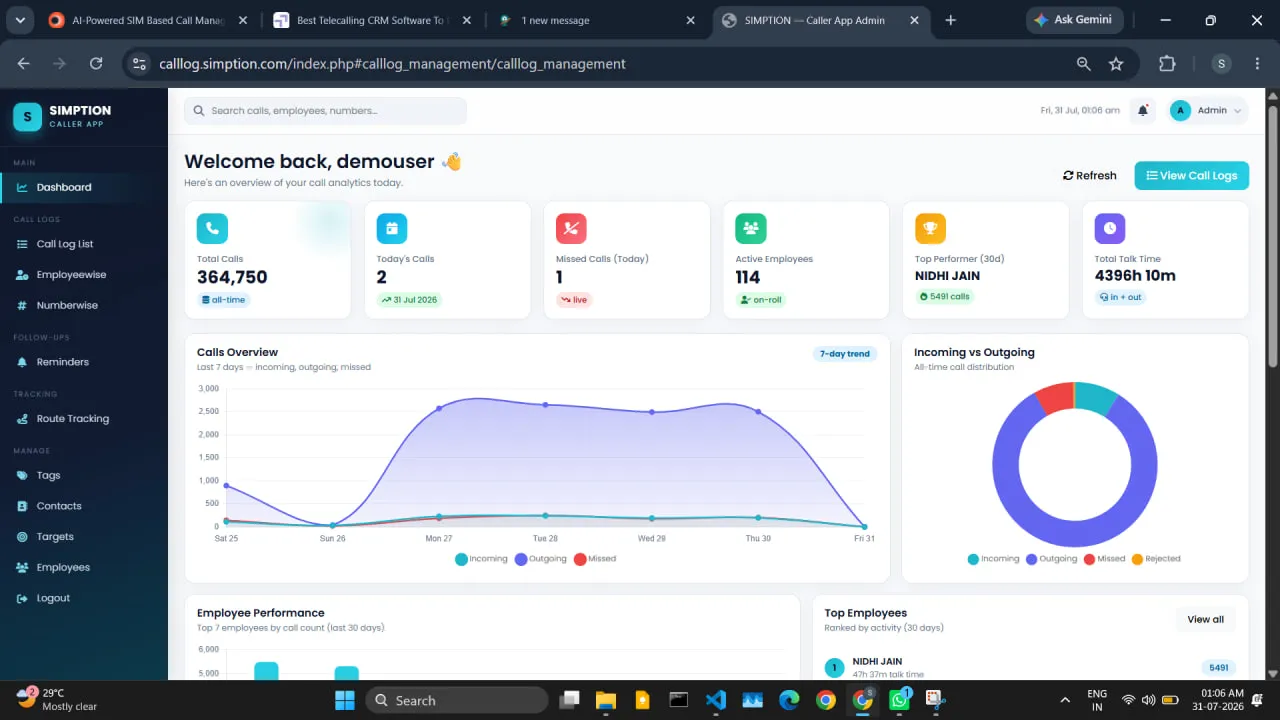
One filter bar, seven views. You aren't filtering a single report to death — each question your team raises has its own answer waiting.
Summary
Calls, talk time, connected count, unique numbers and the full call mix for whatever range you've picked. The view most managers leave open.
Leaderboard
Every rep ranked on the measure you choose, not one we decided for you. Useful in a Monday meeting — dangerous as the only thing you ever look at.
Hourly
Which hours the calls actually happen in. Tells you when the team starts, when it quietly stops, and when your customer is most likely to pick up.
Day-wise
Day by day across the range, so a bad Tuesday doesn't disappear inside a good month.
Never attended
Inbound calls nobody picked up, ranked by how many times that number tried. Usually the first report that pays for the software.
Not picked by client
Your outgoing calls the customer didn't take — the difference between a rep who isn't calling and a rep whose leads have gone cold.
Unique clients
How many different people were actually spoken to. Four hundred calls to forty numbers is not four hundred conversations.
 Sample data
One filter bar, set once.
Every view takes the same filters, so you set them once and switch tabs rather than rebuilding the question each time.
- Date range and a time-of-day range within it
- Employee or a whole team
- Call type — in, out, missed, rejected, not picked up
- Duration with an operator — longer than, shorter than
- Free-text search across numbers and names
- Excluded numbers on or off, so you can see both pictures
- Staff who have left included or hidden
You decide what "connected" means.
Most tools hand you a connect rate and never tell you how it was calculated. Telecaller24 puts the rule where it belongs — with you. Set the minimum duration that counts as connected, the numbers excluded from every report, and how a unique number is identified. Change the rule and every report recalculates against it.
It is the only honest answer to the question every serious buyer asks: why should I trust your numbers? Because they're your numbers, computed by your rule, and you can see the rule.
PDF reports
Any report as a PDF you can attach to an email or carry into a meeting, instead of a screenshot of a dashboard.
Scheduled reports
Pick the reports, the recipients and the hour, and they send themselves. They go out over your own SMTP server, so the mail comes from your domain and not ours. Send-now and test-send buttons, plus a delivery log so you can prove it went.
Daily digest
Yesterday's calls, connect rate, follow-ups kept and follow-ups missed, emailed each morning. Most managers stop opening the dashboard daily and just read this.
CSV export
On every plan. Your data leaves in a format anything can read, whenever you want it.
A monthly grade built from nine things, not one.
Rank a team on call count and you reward whoever dials fastest while ignoring whoever actually sells. The scorecard weighs nine components together, which is what makes the grade survive an argument with the person who received it.
The nine components
- Talk time — time actually spent on the phone
- Connected calls — conversations, not attempts
- Connect rate — how well they get through
- Unique numbers reached — breadth, not repetition
- Active-days presence — did they work the month
- Follow-ups honoured — promises kept on time
- Notes and tags filled in — did they leave a record behind
- Leads closed — the outcome that pays for everything
- Call quality — from Call Intelligence, when you've enabled it
A+, A, B or C
Graded either relative to the month's best performer or absolutely out of 100 — your choice, because those two answer genuinely different questions about a team.
Month on month
Every component carries its change since last month, so you're reading direction and not just position. A C climbing is a better story than an A sliding.
Drill into any rep
Open one person and see which components carried the grade and which dragged it down. That turns a number into a coaching conversation instead of a scolding.
The rep sees it too
Each rep sees their own scorecard in their portal, with the same components and the same weights. Nobody is graded by a number they were never shown.
A pipeline shaped to how you actually sell.
Every business has its own stages and its own idea of what a lead is worth knowing. The pipeline bends to that rather than asking your team to pretend they sell the way the software expects.
Your own lead statuses
Define the stages you actually use — not "Interested / Not interested" because that's what shipped in the box.
Transition rules
A status can require a follow-up date before it will save. Move a lead to "call back" and the system won't let it become a lead nobody owns and nobody remembers.
Lead tags
Tag across statuses — source, budget, language, whatever you slice the pipeline by when you're deciding where to push.
Custom form fields
Add the fields your business needs to the lead form: loan amount, property type, class and board, policy expiry date.
Attempt counting
Every lead carries how many times it's been attempted and how long since the last one — the two facts a rep wants before dialling.
Duplicate protection
Numbers are matched on their last ten digits, so +91, a leading 0 and a bare ten-digit entry are recognised as one person. Stops the same lead being worked twice by two reps.
Bulk import, mapped on screen
Upload the spreadsheet in whatever column order it arrived in and map the columns yourself. No template to reformat before you can start.
Lead reports
Counts and movement by status, by tag, by owner and over time — so you can see where leads enter and where they stall.
Contacts import
Bulk-import a contact list so reps see names instead of bare numbers from their first day, not their third month.
Leads arrive on their own — and get assigned before anyone opens the panel.
A lead sitting unread in an inbox for four hours is usually a lost lead. Each source drops straight into the pipeline with an owner already attached.
Inbound webhook & web forms
Point your website form — or anything that can POST — at one URL, and leads land directly in the panel.
Google Sheets
Telecaller24 polls a sheet and picks up new rows. The least technical integration there is: if your leads live in a sheet today, nothing about that has to change.
IndiaMART
Connected to the IndiaMART Seller Lead API, so buyer enquiries arrive automatically instead of being copied over by hand.
Arrival log per source
Every source keeps a log of what arrived and when — so "we never got that lead" is a question with an answer instead of an argument.
Auto-assignment
Each source assigns itself: to one named person, or round-robin across a team. Leads are owned from the second they arrive.
REST API, keys and outbound webhooks
One authenticated API instead of a different integration for every tool. Issue and revoke keys from a management screen in the panel, and push events out to your own systems as they happen.
- /api/v1/calls
- /api/v1/leads
- /api/v1/employees
- /api/v1/meta
- /api/v1/ping
- /api/v1/inbound
Available as an add-on. See pricing.
Every rep gets a browser dashboard, not just an app.
The app is for the phone in their hand. The portal is for when they're sitting at a desk — and it is quietly the reason teams stop resisting the rollout. A rep who can see their own numbers is being measured by something they can check, which is a very different feeling from being measured by something they can't.
Dashboard
Their day at a glance — calls, talk time, what's still pending.
Call logs
Their full call history, filterable, with the remark and tag on each one.
Number-wise view
One customer number and every interaction with it, in order.
Leads
The leads assigned to them, with status, attempts and next action.
Reminders
Their follow-ups — overdue, today and upcoming.
Contacts
The contact list they work from, searchable.
Route
Their own day's trail and distance — the same thing their manager sees.
Their scorecard
Their monthly grade with all nine components and the month-on-month change.
Profile & settings
Their own details, preferences and device state.
Reps sign in with an employee ID — no email address required, which matters when half a field team doesn't have one.
Know the difference between a quiet rep and a dead handset.
This is the failure that quietly ruins call-tracking rollouts everywhere. A phone stops syncing — battery optimisation, a force-stop, a reinstall — and the report shows zero calls. The manager reads that as a rep who didn't work. One unfair conversation later, trust in the numbers is gone and the software is on its way out.
Four independent liveness signals
Sync Health watches four separate signs of life rather than relying on one, so a single flaky signal can neither raise a false alarm nor hide a real outage.
Silent handsets, named as such
A device that has stopped talking to the server is listed as silent — not quietly reported as a rep with no calls.
The distinction that matters
"The handset stopped reporting" and "the rep stopped calling" are two different states on this screen, because you act very differently on each.
Fix it before you raise it
The board points at the device that needs attention, so the conversation is about a phone setting instead of an accusation you can't take back.
We still don't record calls. We can synchronise the ones your phones already made.
Android does not let any third-party app record a call — not us, not anyone who tells you otherwise. What many Indian Android phones do have is recording built into the manufacturer's own dialer, announced on the line by the handset itself. If your team already works that way, Telecaller24 can find those files and bring them into the panel against the right call. If they don't, nothing changes and there is nothing to sync.
Exactly how it works — the part that matters legally
- The handset records, not us.The manufacturer's dialer creates the file, under its own setting and its own announcement to both sides. The Telecaller24 app has never recorded a call and technically cannot.
- The rep chooses to upload, one file at a time.Upload is never automatic. Nothing the rep did not deliberately send ever leaves the phone.
- Off unless you switch it on.Recording sync is an owner-level setting and it ships off. Every other feature on this page works without it.
Finds the file
Scans the recording folders used by Vivo, Xiaomi, Oppo, Samsung, Realme, OnePlus and stock Android, and discovers unlisted vendor folders on its own. A built-in diagnostic explains why a particular handset has nothing to show, rather than failing silently.
Matches it to the right call
Four tiers, most confident first: a timestamp embedded in the filename, then number plus time window, then number alone, then time window. Handles the vendors whose files are named with nothing but an epoch.
Plays where you need it
Stream it in the panel against the call row it belongs to, or play it on the phone first — a rep can listen before deciding whether to upload at all.
Verified upload
The server re-reads the stored file from disk and returns its byte count. The phone keeps that number and checks it. A silent half-upload isn't possible.
24-hour retention sweep
The local copy is deleted only when three things hold: the server confirmed it, the confirmation is 24 hours old, and the byte counts match. A mismatch re-queues the upload instead of deleting. The clock starts at upload, so a recording that waited a week offline still gets its full day.
Recording Storage console
Disk usage overall and per employee, a quota bar, and every file classified as linked, orphaned or missing. A nightly purge enforces the retention window you set.
Call Intelligence — AI review, on your key, with a cap you set.
With recording sync switched on, Telecaller24 can review synced calls automatically: how the conversation went, in Hindi or English, without a manager listening to two hundred recordings to find the four that needed attention.
- Your own API key and model. You supply the key and pick the model. The cost is yours, visible to you, and we don't resell tokens.
- Sentiment and a score. Positive, neutral or negative, plus a 0–100 quality score that can feed the monthly scorecard.
- Hindi and English. Reviewed in the language the call actually happened in.
- Bounded on purpose. Set a minimum call length so eight-second calls aren't analysed, and a daily cap so a busy day can't run up a bill you didn't expect.
- A reviewed-calls list. Every reviewed call with its score, so you can go from a number straight to the conversation that produced it.
Recording is the one part of this product with real legal weight. Consent comes from the handset's own announcement and from your employee and customer notices — not from a setting in a dashboard, and not from us. If you are unsure whether to turn it on, the honest answer is to leave it off. Everything else here works without a single recording.
The details you only notice when they're missing.
None of these sell a demo on their own. All of them are the reason a rollout is still running in month eight.
Three roles, plus fine-grained permissions
Owner, manager and viewer — and on top of that, individual permissions for who may change settings, manage users and manage employees. Enforced on every page, not just hidden from the menu.
Teams
Group reps into teams, then filter and compare by team everywhere. A twelve-person phone room and a twelve-person field crew should never be averaged into one number.
Global search
One box at the top searches employees, phone numbers and leads at the same time. You rarely know which of the three you're looking for when you start typing.
Number detail
One customer number and every call anyone in the company has had with it — each person's remark, tag and follow-up, in order.
Employee profile
One rep's full history on a single screen, with their scorecard and their day beside it.
WhatsApp message templates
Templates with a title, the message text, a call note and an attachment link — so the follow-up message that goes out is the one you approved, every time.
When someone leaves
Deactivate the rep and their history stays exactly where it is: filtered correctly out of active views, still there when you need last quarter's numbers. The relationship stays with the company, and so does the record.
What the rep's app does, in full.
Call capture is automatic and needs nobody to type anything. Everything below is what turns a captured call into something a manager can read — and what stops the app being the thing your team quietly uninstalls.
Works with no signal
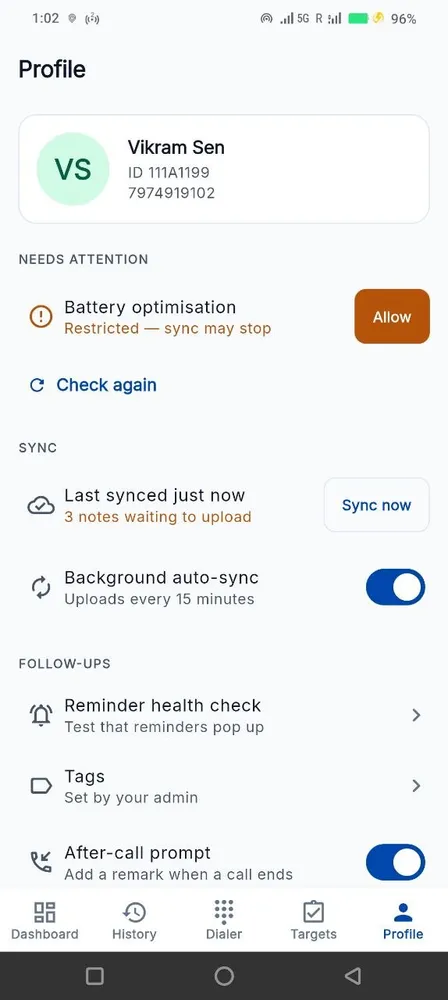
Every screen works offline. Calls, remarks, tags, follow-ups and GPS points queue on the phone and drain when the network returns. A rep in a basement or a lift loses nothing.
The card after the call
A floating card appears the moment a call ends and holds for ten seconds. The remark gets typed while the conversation is still fresh — which is the only reason notes ever actually get filled in.
Reminders over two channels
Every follow-up fires twice, five minutes before and on time, over two independent channels: an exact alarm on the device and a push from our server. When an aggressive phone kills the app and the alarm dies with it, the push still lands.
Reminder Health Check
A screen that tests every link in the reminder chain — notification permission, heads-up banners, exact alarms, battery optimisation, manufacturer autostart, sound, Do Not Disturb — and deep-links into the exact settings page that fixes each failure. "Can't tell" is reported as a warning rather than a false pass.
T9 name search
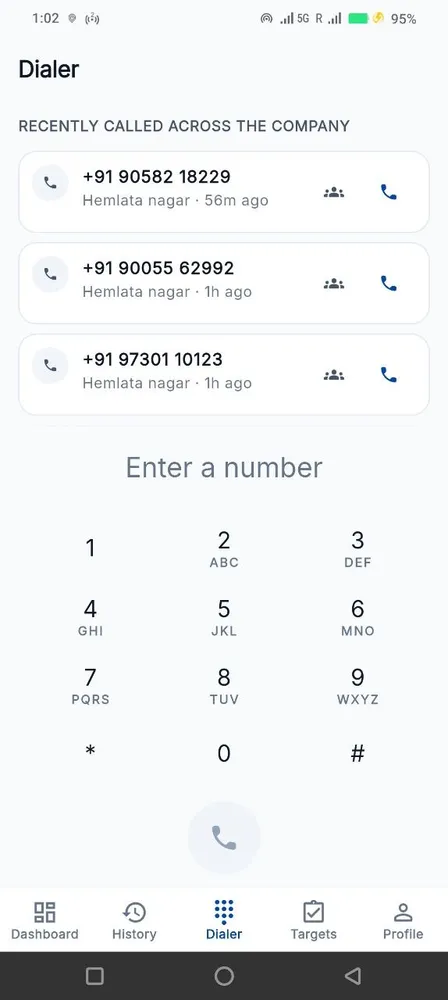
Type 264 and find Amit. The digits search names as well as numbers, because a telecaller knows the person, not the number.
Company memory before you dial
The dialer suggests from the whole company's history, and one tap shows every colleague's calls with that number and what they wrote. Stops two reps pitching the same lead on the same afternoon.
Dual SIM
Long-press to choose which SIM places the call — the difference between your work number and your personal one appearing on the customer's screen.
Their own route
The rep sees the same trail their employer sees, with today's path and distance. Built before the admin map on purpose: nobody should be tracked by something they can't look at.
Sync that answers
Sync-now reports what actually happened instead of spinning, with last-sync time and pending items shown — so nothing is ever silently stuck.
Dark mode
Light, dark or follow the system, on every screen. Not one screen that forgot.
Readable at double size
Layouts hold up to 2.0× system text — the setting budget handsets and older users genuinely ship with. A procurement answer more than a marketing one.
Seven call types, kept apart
Incoming, outgoing, missed, rejected, blocked and not-picked-up are counted separately instead of collapsed into "missed" the way most trackers do.
 Sample data
 Sample data
Built to be something you can explain in your Monday meeting.
A tool your team resents is a tool your team uninstalls. Every one of these is a deliberate decision, and each one is a sentence you can say out loud to the people being measured.
We don't record calls.
The app has never recorded a call and can't — Android forbids it. Where a handset's own dialer records, Telecaller24 can synchronise those files: off by default, switched on by you, uploaded only when the rep chooses to. Recording customer conversations without consent creates liability for you under the DPDP Act, and we'd rather you went in with your eyes open than discovered that later.
Personal calls stay personal.
Your reps can exclude any number — family, doctor, friends — and those calls never leave their phone. Ever.
Location only during work hours.
GPS starts when the workday starts and stops when it ends. Evenings and Sundays are nobody's business but theirs.
Your data is yours.
Export it any time, in full, at no charge. Cancel and we delete it. There is no lock-in and no fee to get your own data out.
Telecaller24 is Android-only. Apple does not allow any app to read the iPhone call log — that's an iOS restriction, not a gap in our product. If your team is on iPhones, no call tracking app of this kind can work, and anyone who says otherwise is selling you something else.
Ask for any of it by name.
Put Telecaller24 on five phones, let it run for two days, and we'll walk you through what it captured — including whichever module on this page you came here for.
From ₹149 per number per month. Minimum 5 numbers. 15-day free trial, no card.